
By Alicia Penn and Nelson Garcia
In a case with wiretaps[1] or pen register trap and trace[2] discovery from phone calls or messages, the government may produce the data to you using Package Explorer. Package Explorer is a proprietary viewer that will let you view the data exported from 4Sight UCM, a program used by law enforcement to process information from phones.
You will know you’ve received a Package Explorer file because it will most often look like this:

To open double-click on PackageExplorerLaucher.exe. Note: It is important to maintain the folder structure provided for Package Explorer to work properly. Make sure when you download and copy to your computer or hard drive that you copy from the highest folder and that you make no changes to any of the folders or files.
Package Browser
The home screen is the Package Browser view — a spreadsheet that can be adjusted to suit your preferences. Each line of the spreadsheet is single packet—the data from a single phone call, a text message, or a use of an app. The spreadsheet calls these “products.” You can see that the icon indicates what the product is.

The “Audio” in the Content column indicates there’s an audio file and a possible Synopsis Document included.

SMS icon and “Text” in the Content column indicates there’s a text message included.

You may also see other icons used such as MMS. MMS is another type of text messaging but may also contain multimedia content.
Note: Sometimes Geolocation data can be retrieved from the SMS/MMS or Audio packet content.
Without opening any package further and seeing its contents, in the Package Browser view alone you can drag columns to reorder them, sort by column, and conduct searches. This function is helpful in productions where you receive a large quantity of records—you can sort or filter in the Package Browser spreadsheet view before getting into the information from each package.
Package Viewer
To find out more information about a single product (communication/interception/packet), double click on its individual line. This will open the Package Viewer.
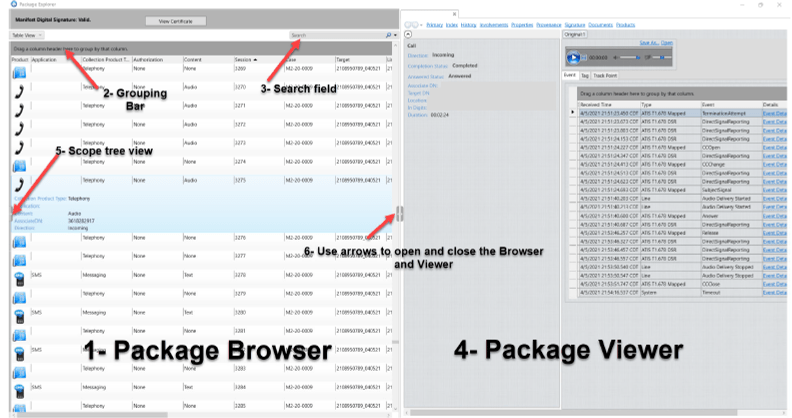

In the Package Viewer window, you can see the packet’s contents. These will vary depending on what the product is—a phone call, a text message, an app access.
Package Viewer: Telephone Call
In the example below, the product is a telephone call. The viewer may show you the direction of the call, its location, whether it was answered, and the length of the call. You can play the audio file of the call or download it by clicking on the “Save As” option.

If it exists, you can find the synopsis of the call by navigating to the Documents tab in the viewer. Note: the search bar will not search text message contents—it will only search the line items in the Browser spreadsheet—the packet entries but not its contents.
Package Viewer: Text Message
If the product is a SMS (a text message) when you double click on it the information you will be able to see may include the direction, recipient, time sent, location, and contents. An example is below:

As in an audio entry, you will be able to save the text message content by clicking on the “Save As” link on the top right. Clicking on the Index tab will give you the option to download the SMS file in rtf format as well as the Synopsis Document Product if there is one.
Package Viewer: App Usage
Package Explorer may include application usage on a phone, such as WhatsApp. What you will be able to see depends on whether the data was encrypted by the app. Other examples of Apps you might see are YouTube, Facebook, Google, etc. Even though you may get some information on other apps, you may not get anything useful as it pertains to the wiretap case.

As always, if you need help navigating through Package Explorer, please contact the NLST for support.
[1] A wiretap allows real-time interception of the content of communications.
[2] Pen register and trap and trace devices (known as “PRTT” devices) recording outgoing (pen register) and incoming (trap and trace) phone information. They are regulated by Title III of the Electronic Communications Privacy Act of 1986 (“ECPA”). 18 U.S.C. § 3127. “Specifically, PRTT devices record the dialing, routing, addressing, and signaling information—essentially, the phone numbers with which the subject cell phone has communicated—but not the contents of those communications, which remain governed by Title I’s wiretap provisions.” In re Search Warrant Application for Location Info., 754 F. Supp. 3d 1099 (D.N.M. 2024).
Neither the outgoing data collected by pen registers nor the incoming data collected by trap and trace devices include the contents of the messages themselves.